Know who unlocked your device.

Your passcode isn’t a secret. Failshot photographs whoever unlocks your device while it’s on.

Download for Mac

Early-bird price for life: £3.99 a month or £23.99 a year, VAT included, when you subscribe by 31 October.

Coming soon to iPhone and Android. Get early access:

Your device

iPhone first, then Android. We’ll email you when Failshot is ready to download. Nothing else, and you can leave at any time. How we handle your email

See how it works

Skip the animation
  1. A phone asking for its PIN, with a notice at the top: Failshot is on.

    Every device has a passcode.

  2. The passcode 123456 typed in, all six dots filled.

    Passcodes like 123456 take a second to learn over a shoulder.

  3. The phone unlocked into Failshot, which has just taken a photo with the front camera.

    Failshot kicks in.

    Whoever unlocks your device while Failshot is on is photographed with the front camera.

  4. An alert on the phone: Someone unlocked your device, at 12:48, while Failshot was on.

    You know who.

    Failshot keeps the photo for you. With email alerts on, it’s emailed to you with the time.

On Mac now. Coming soon to the App Store and Google Play.

Why Failshot

You unlock your device on the bus, at the table, at work.

Your device never tells you who else has been in it.

Failshot does.

How it works

Put your device down without wondering.

Show the steps for

On iPhone

  1. Turn Failshot on.

    Then lock your device while Failshot is open. Your Lock Screen can show that it’s on.

  2. Someone unlocks it.

    Whoever unlocks it lands in Failshot and is photographed with the front camera.

  3. You see who.

    Switch Failshot off with Face ID or your Failshot PIN. Your own unlock is deleted. Anyone else’s is kept for you.

On Android

  1. Turn Failshot on.

    It keeps working in the background, even while your device is locked.

  2. Someone tries to get in.

    A wrong PIN, pattern or password at the lock screen is photographed with the front camera, and so is whoever unlocks it.

  3. You see who.

    Switch Failshot off with your fingerprint, face or Failshot PIN. Never the device’s own PIN.

Try it

Knowing the passcode isn’t enough.

You’ve picked up a device with Failshot on, and you know its passcode. Try to switch Failshot off.

Failshot

Enter your Failshot PIN

Not the device’s passcode. A wrong PIN takes another photo.

Photos taken: 0

    A demo. It doesn’t use your camera, and nothing you type leaves this page.

    Features

    Knowing your passcode isn’t enough.

    Your Failshot PIN

    Only you can switch it off.

    Switching Failshot off takes Face ID or your own six-digit Failshot PIN. Never the device’s passcode.

    • A wrong Failshot PIN takes another photo.
    • On iPhone, if a new face is added to Face ID, Failshot asks for your PIN instead.
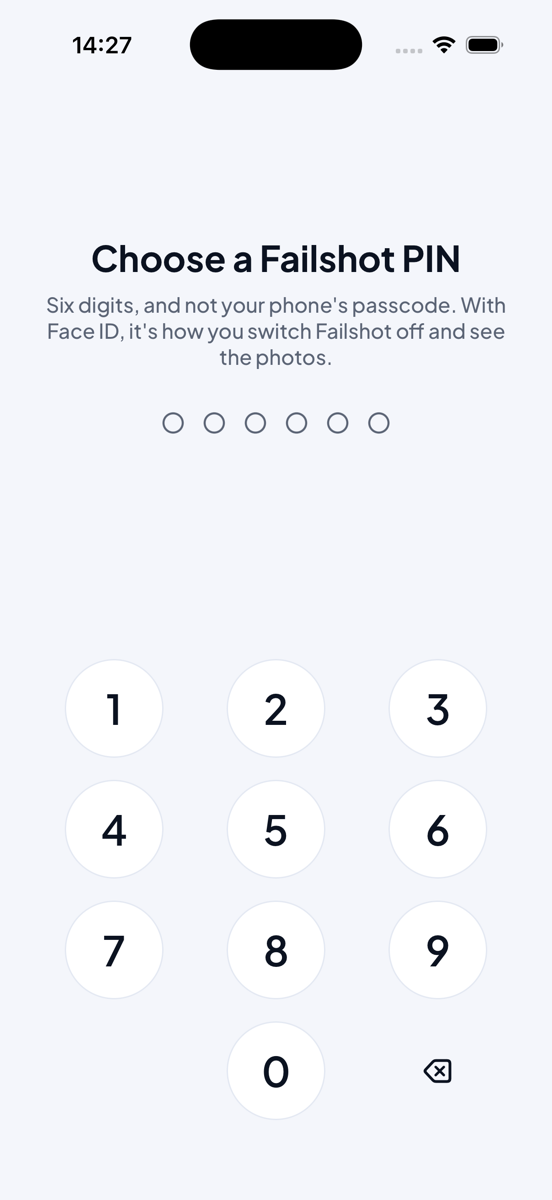
    Failshot on iPhone. Choose a Failshot PIN: six digits, and not your phone’s passcode. With Face ID, it’s how you switch Failshot off and see the photos.
    Lockdown

    Suspect someone? Lock it down.

    In Lockdown, switching Failshot off takes three things: Face ID or your fingerprint, your Failshot PIN, and the answer to a question only you know.

    Every wrong try is photographed.

    Email alerts

    The photo and the time, in your inbox.

    If someone unlocks your device while Failshot is on and doesn’t prove it’s you, Failshot emails you their photo and the time.

    Email alerts are optional, and off until you turn them on.

    Web vault

    Device gone? The photos aren’t.

    Turn on the web vault and Failshot keeps a copy of each alert’s photos online. If your device is lost or taken, sign in at failshot.app/vault from any browser and see who had it.

    Photos are encrypted on your device before they leave it, so we can’t open them. They’re deleted after 30 days, or 7 or 90 if you choose.

    Lock Screen notice

    Never a hidden camera.

    Your device shows its own camera light whenever Failshot takes a photo. While Failshot is on, your Lock Screen can say so too, so anyone who picks up your device is told before they unlock it.

    Failshot is for your own device. It’s never a way to watch someone else.

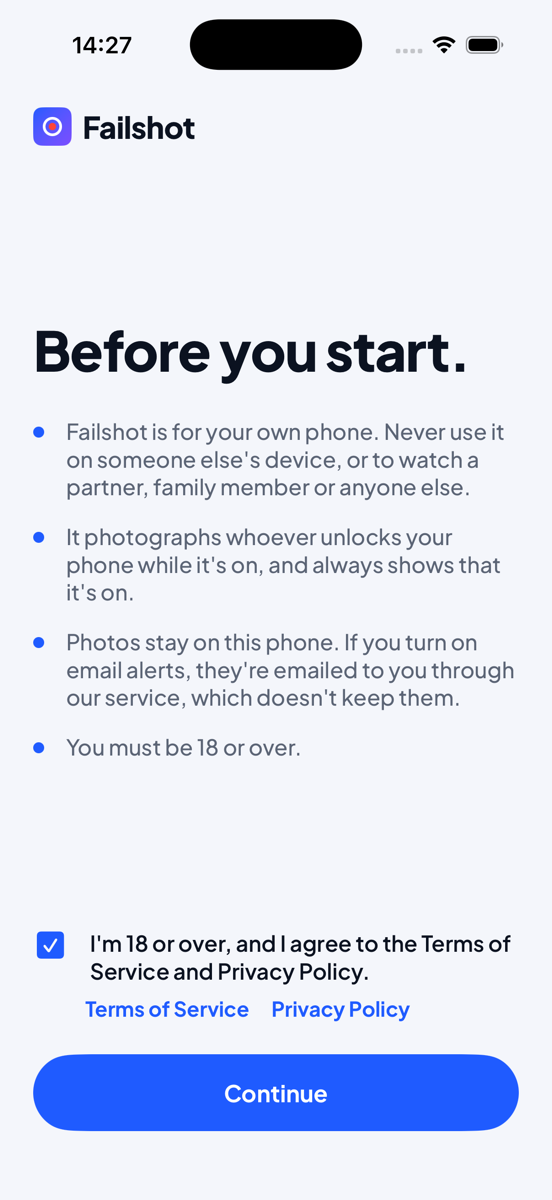
    Failshot on iPhone. Before you start: Failshot is for your own phone. Never use it on someone else’s device, or to watch a partner, family member or anyone else. It photographs whoever unlocks your phone while it’s on, and always shows that it’s on.
    Widgets

    See it at a glance.

    Widgets on your Home Screen, and on an iPhone’s Lock Screen, show whether Failshot is on, and any unconfirmed unlocks.

    On Android

    Wrong guesses, caught.

    Failshot photographs a wrong PIN, pattern or password at the real lock screen.

    Coming soon

    Left your Mac on your desk?

    Turn Failshot on from your iPhone or the web vault, wherever you are. Switching it off will still need you, on the device itself.

    Privacy

    Your photos stay on your device.

    Unless you turn on email alerts or the web vault. Alerts pass through without being kept. Vault photos are encrypted on your device first, so we can’t open them.

    • Kept on your device.

      Photos are stored on your device, and left out of cloud backups.

    • Passed through, never kept.

      With email alerts on, photos pass through our service only to reach you. Our email provider keeps sent emails for up to 30 days.

    • No ads or tracking in the app.

      No advertising, no tracking and no face recognition.

    • No account needed.

      Use Failshot without an account. You only need one for email alerts or the web vault.

    Where a photo can go, if you turn on email alerts

    1. Your deviceKept here
    2. Failshot’s serviceKeeps nothing
    3. Our email providerKeeps sent email up to 30 days
    4. Your inboxYours to keep or delete
    • Never a hidden camera
    • Never face recognition
    • Never ads
    • Never sold, or shared for advertising

    The apps and your vault carry no ads and no tracking. This website uses Google’s measurement cookies only if you accept them in the cookie message; decline, and it loads nothing from anyone else. How we use cookies

    Pricing

    One plan. Every device.

    Failshot Pro includes everything Failshot does, on every device you sign in to. Pay monthly or yearly.

    Early-bird price for life on Mac. Subscribe in the Mac app by 31 October 2026 and keep this price for as long as you stay subscribed. Prices include VAT.

    • Monthly

      £3.99 £5.99

      a month

      • Billed every month
      • Cancel any time
      Download for Mac
    • Annual

      Best value

      £23.99 £35.99

      a year

      • £2.00 a month, billed yearly
      • Cancel any time
      Download for Mac

    From 1 November 2026, new Mac subscriptions cost £5.99 a month or £35.99 a year. Paid by card in the Mac app; cancel any time in Failshot, Settings, Subscription.

    On iPhone and Android, when they arrive: £4.99 a month or £29.99 a year in the App Store and Google Play, billed by Apple or Google.

    Outside the UK, the local price is shown in the store.

    On Mac now. Coming soon to the App Store and Google Play.

    FAQ

    Questions and answers.

    Is Failshot spyware?

    No. Failshot is for your own device, and it never uses the camera in secret: your device shows its camera light whenever Failshot takes a photo. Never use it on someone else’s device, or to watch anyone.

    Why doesn’t my iPhone photograph a wrong passcode?

    Apple doesn’t let any app see the Lock Screen or use the camera in the background. So on iPhone, you turn Failshot on and lock the device, and whoever unlocks it lands in Failshot and is photographed. On Android, Failshot photographs a wrong PIN, pattern or password at the real lock screen.

    Can someone who knows my passcode switch it off?

    No. Switching off needs Face ID or your own Failshot PIN, never the device’s passcode. On iPhone, if a new face is added to Face ID, Failshot asks for your PIN instead.
    Where do my photos go?

    They stay on your device. If you turn on email alerts, they’re emailed to you through our service, which doesn’t keep them. Our email provider keeps sent emails for up to 30 days. If you turn on the web vault, they’re encrypted on your device and kept online for 30 days, or 7 or 90 if you choose. We can’t open them.

    Can I see the photos if my device is lost or stolen?

    Yes, if you’ve turned on the web vault. Sign in at failshot.app/vault from any browser. The photos are encrypted on your device before they leave it, and only your vault key opens them in your browser.

    How much is it, and how do I cancel?

    On Mac, Failshot Pro is £3.99 a month or £23.99 a year, VAT included, if you subscribe by 31 October 2026, and you keep that price for as long as you stay subscribed. From 1 November, new Mac subscriptions cost £5.99 a month or £35.99 a year. You pay by card in the Mac app and can cancel any time in Failshot, Settings, Subscription. On iPhone and Android, when they arrive, it will be £4.99 a month or £29.99 a year through the App Store and Google Play. One subscription covers every device you sign in to with the same email.

    Will it keep photos of me?

    No. When you switch Failshot off with Face ID or your PIN, the photo of your own unlock is deleted automatically. Anyone else’s is kept for you.

    When can I get it?

    Failshot for Mac is out now: download it from failshot.app. iPhone and Android are coming soon to the App Store and Google Play; get early access and we’ll email you when they’re ready.

    Early access

    Be first to try Failshot.

    Your device

    iPhone first, then Android. We’ll email you when Failshot is ready to download. Nothing else, and you can leave at any time. How we handle your email

    Failshot for organisations. Protect the devices your organisation issues.

    Failshot for organisations